Migrate Between Instances in One Bucket (Different Root Paths)
This topic details the process of backing up a collection from one Milvus instance and restoring it to another while using a shared bucket for object storage, with distinct root paths for each instance.
Overview
The diagram below illustrates the backup and restore process using a shared bucket.
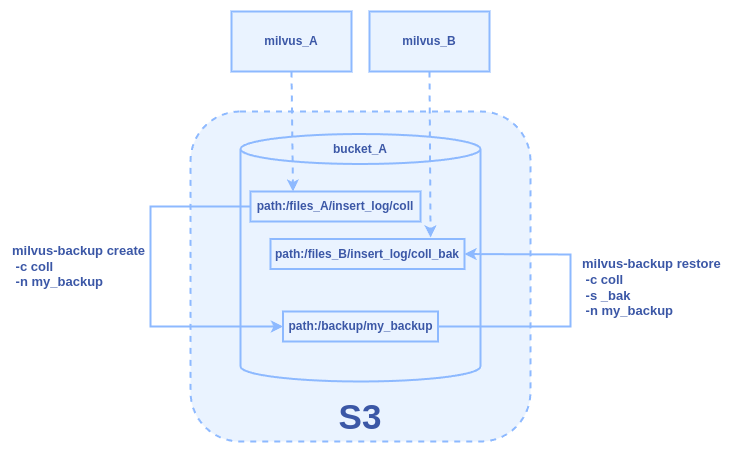
Assume we have Milvus instances, milvus_A and milvus_B, both utilizing
the default MinIO storage engine for object storage. These instances
share the same bucket, bucket_A, but store their data in different root
paths: files_A for milvus_A and files_B for milvus_B. In this example,
our goal is to complete the following tasks:
-
Create a backup (my_backup) for collection coll that is stored under the
files_Apath formilvus_A. -
Restore from the backup and store it to files_B for
milvus_B.
Prerequisites
-
Ensure the milvus-backup tool is installed.
-
Familiarize yourself with configuring Milvus object storage settings. For details, refer to Object Storage.
Back up a collection from milvus_A
Step 1: Prepare configuration
Go to the directory of the milvus-backup project and create a directory named configs:
mkdir configs
cd configs
Download the backup config file backup.yaml:
wget https://raw.githubusercontent.com/zilliztech/milvus-backup/main/configs/backup.yaml
The file structure looks like this:
├── configs
│   └── backup.yaml
├── milvus-backup
└── README.md
Step 2: Edit configuration file
Modify the backup.yaml file to set the appropriate configurations for
milvus_A:
-
Connection configs
# milvus proxy address, compatible to milvus.yaml
milvus:
  address: milvus_A
  port: 19530
  authorizationEnabled: false
  # tls mode values [0, 1, 2]
  # 0 is close, 1 is one-way authentication, 2 is two-way authentication.
  tlsMode: 0
  user: "root"
password: "Milvus"-
milvus.address: IP address or hostname of themilvus_Aserver. -
milvus.port: TCP port on which Milvus server is listening (default 19530).
-
-
Storage configs (MinIO/S3 settings)
# Related configuration of minio, which is responsible for data persistence for Milvus.
minio:
  # cloudProvider: "minio" # deprecated use storageType instead
  storageType: "minio" # support storage type: local, minio, s3, aws, gcp, ali(aliyun), azure, tc(tencent)

  address: milvus_A # Address of MinIO/S3
  port: 9000   # Port of MinIO/S3
  accessKeyID: minioadmin  # accessKeyID of MinIO/S3
  secretAccessKey: minioadmin # MinIO/S3 encryption string
  useSSL: false # Access to MinIO/S3 with SSL
  useIAM: false
  iamEndpoint: ""

  bucketName: "bucket_A" # Milvus Bucket name in MinIO/S3, make it the same as your milvus instance
  rootPath: "files_A" # Milvus storage root path in MinIO/S3, make it the same as your milvus instance

  # only for azure
  backupAccessKeyID: minioadmin  # accessKeyID of MinIO/S3
  backupSecretAccessKey: minioadmin # MinIO/S3 encryption string

  backupBucketName: "bucket_A" # Bucket name to store backup data. Backup data will store to backupBucketName/backupRootPath
backupRootPath: "backup" # Rootpath to store backup data. Backup data will store to backupBucketName/backupRootPath-
minio.bucketName: Name of the bucket used formilvus_Astorage. In this example, set tobucket_A. -
`
-